
Shipping luggage, boxes, or personal items internationally can often feel complicated—but with LuggageToShip, it’s quick, simple, and stress-free. Whether you’re relocating, traveling for business, or sending personal belongings across borders, LuggageToShip provides a fast and affordable luggage shipping solution designed to save you time and money.
This guide explains how to book your shipment with LuggageToShip—from creating an account to confirming your order—so you can send your luggage anywhere in the world with confidence.
Table of Contents
Steps of Booking Online with LuggageToShip
Here are the simple steps of booking your shipment with LuggageToShip
Step 1: Create Your LuggageToShip Account
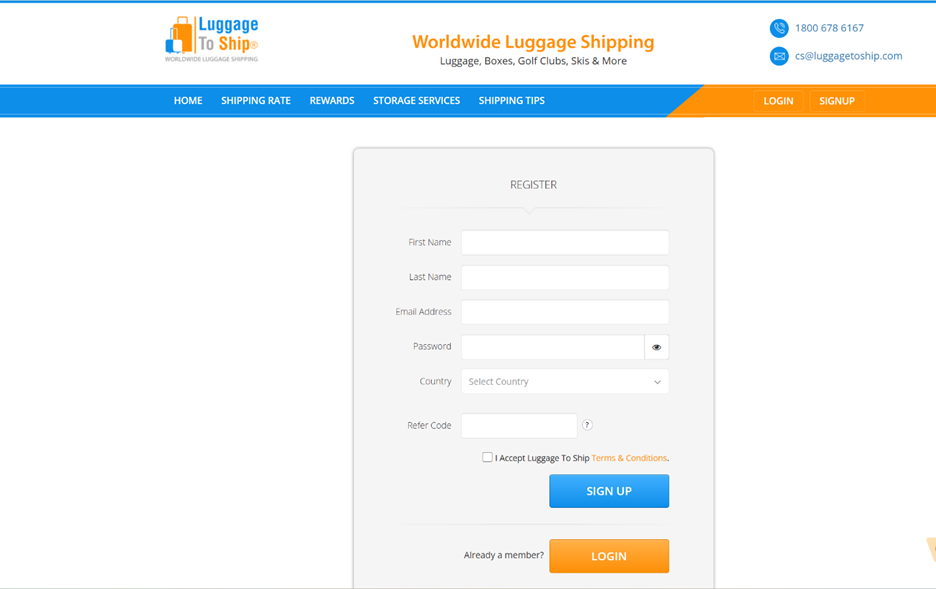
Before booking your first shipment, you’ll need to create a free account.
Visit LuggageToShip Registration and fill in basic details such as your first name, last name, and email address. Once you’ve registered, you can log in and access your personalized shipping dashboard.
Your LuggageToShip dashboard is your central hub for all shipment-related activities. From here, you can track shipments, check shipping rates, redeem rewards, and manage account settings.
Step 2: Explore Your Dashboard
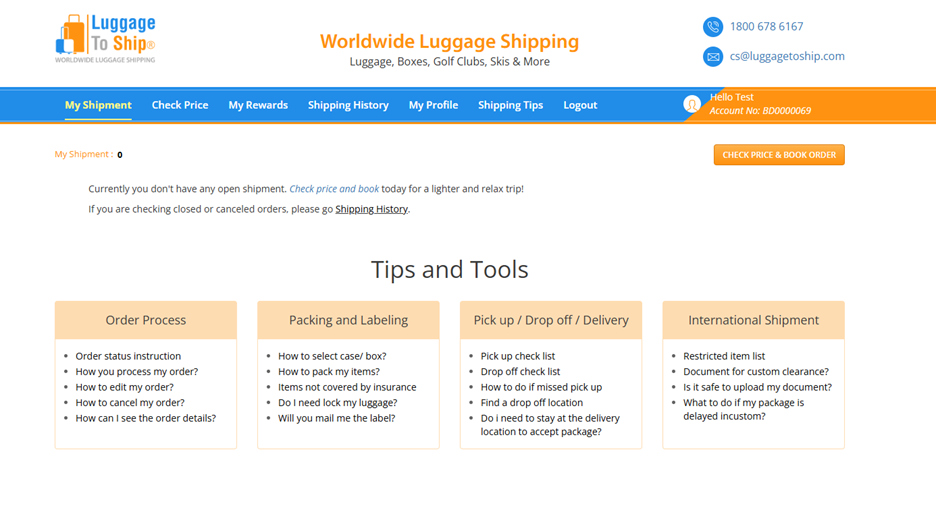
After logging in, you’ll see several key sections designed to make your shipping experience smooth and organized:
- My Shipment – View and track your active shipments in real time.
- Check Price – Instantly check shipping prices based on your item type, destination, and carrier.
- My Rewards – Access and manage your referral rewards and earned credits.
- Shipping History – Review all your past shipments in one place.
- My Profile – Update your personal details, addresses, and preferences.
- Shipping Tips – Discover helpful advice on safe, affordable, and fast luggage shipping.
- Log Out – Securely end your session to protect your account.
This intuitive dashboard allows you to handle everything in one place—making international luggage shipping more efficient than ever.
Step 3: Start Your Shipment Booking
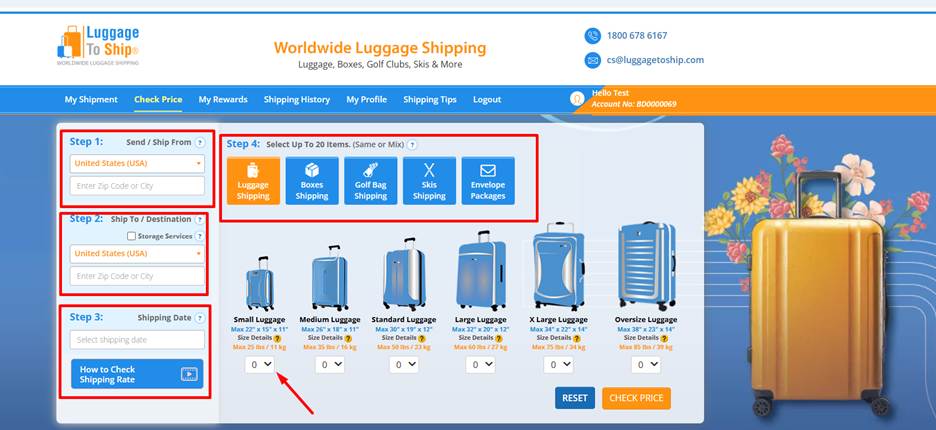
To begin, click on the “Check Price” tab in your dashboard. This is where you can calculate your shipment cost and start the booking process. LuggageToShip’s system automatically provides real-time price comparisons across top carriers like FedEx, UPS, and DHL, helping you choose the best option for your budget and timeline.
Here’s a breakdown of the steps involved:
Step 3.1 – Select Origin Country and City
Choose the country and city where your items will be picked up. Providing accurate pickup information ensures that the courier can collect your luggage on time without any delays.
Step 3.2 – Select Destination Country and City
Next, enter the destination details—the country and city where your shipment will be delivered. LuggageToShip uses this information to generate the most accurate rates and available shipping options.
Step 3.3 – Choose Your Shipping Date
Pick your preferred pickup or delivery date. You can schedule your shipment in advance based on your travel plans or convenience.
LuggageToShip supports a wide variety of shipment types, including luggage, boxes, golf bags, skis, and envelopes. Simply select the item type, specify quantity, size, and weight, and move forward.
Once you’ve entered your details, you’ll see real-time shipping quotes from multiple global carriers—allowing you to instantly compare and select the best rate.
After confirming your choice, click “Continue” to move to the next section.
Step 4: Review Details in the Order Processing Panel
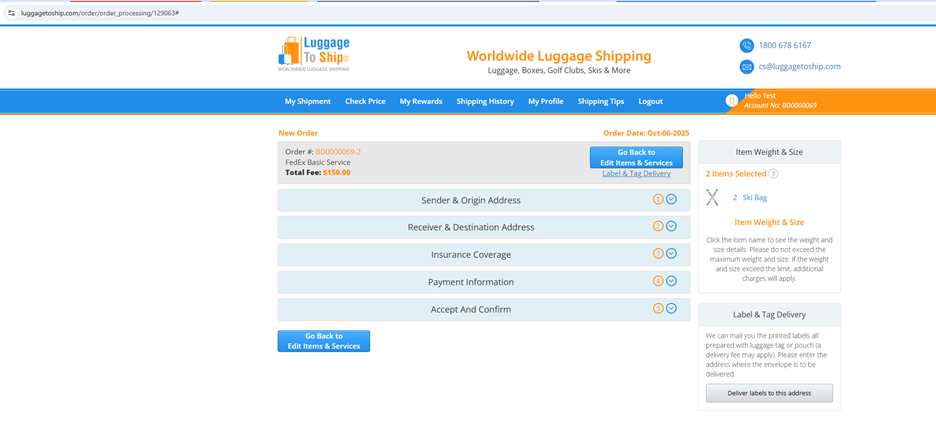
After selecting your preferred carrier, you’ll be directed to the Order Processing Panel. This is the final stage before confirming your order, where you can review and modify your shipment details.
In this section, you can:
- Edit Sender and Origin Address – Make sure your pickup location and contact details are correct.
- Edit Receiver and Destination Address – Update recipient information and delivery address.
- Select Insurance Coverage – Add shipment protection based on your item’s value and type.
- Update Payment Information – Confirm your payment method before completing the order.
Once everything is accurate, click ‘Accept and Confirm’ to finalize your booking. Your order will now be processed, and you’ll receive a confirmation email with shipment tracking details.
Quick Booking from the Homepage
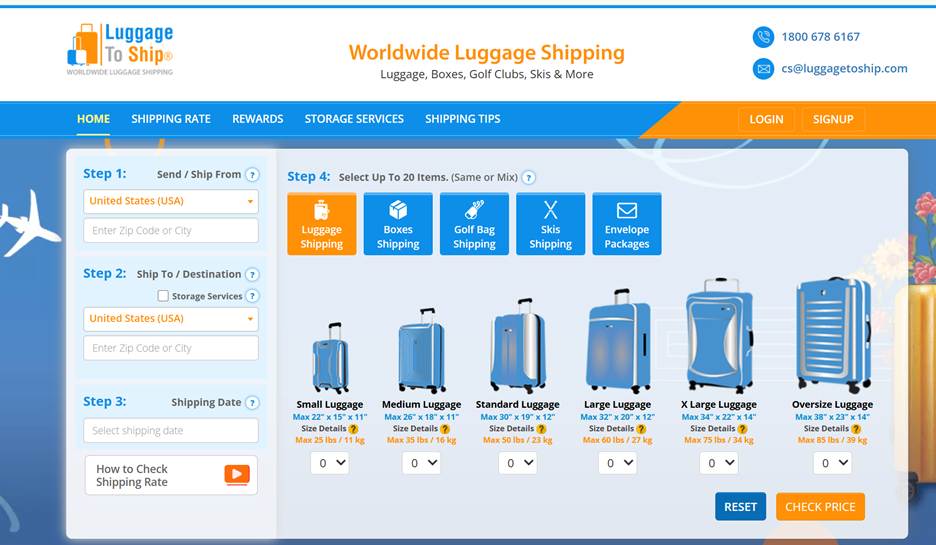
For an even faster experience, you can begin booking directly from the LuggageToShip Homepage. Simply enter:
- Origin and destination
- Shipping date
- Shipment type (luggage, box, golf bag, etc.)
After selecting your details, you’ll see instant price estimates. To continue and confirm your booking, simply log in to your account.
This feature is perfect for frequent travelers or returning customers who want a fast and simple booking process.
Why Choose LuggageToShip?
LuggageToShip stands out as a trusted luggage shipping company for international and domestic deliveries. Here’s why thousands of travelers, students, and families rely on it:
- Convenient Online Booking – Schedule shipments from anywhere, anytime.
- Real-Time Price Comparison – Get instant quotes from FedEx, UPS, and DHL.
- Affordable Rates – Save money with transparent and competitive pricing.
- Door-to-Door Service – Enjoy full convenience from pickup to delivery.
- Secure and Insured Shipping – Add insurance protection for valuable items.
- Tracking and Notifications – Monitor your shipment’s progress in real time.
- Eco-Friendly Shipping – Reduce carbon emissions with optimized routes and packaging.
With LuggageToShip, sending luggage overseas or across the country has never been easier.
Tips for a Smooth Shipping Experience
To make your booking and delivery even smoother, follow these best practices:
- Pack Smartly – Use sturdy luggage or boxes and secure fragile items with bubble wrap.
- Label Clearly – Always label your packages with sender and recipient details.
- Check Restrictions – Avoid restricted items like batteries, aerosols, or flammable materials.
- Track Your Shipment – Use your tracking number to stay updated.
- Book Early – Schedule your pickup a few days in advance to avoid last-minute issues.
These simple steps ensure a hassle-free shipping experience from start to finish.
FAQs AboutHow to Book Your Shipment
1. Can I book a shipment without creating an account?
You can check prices without logging in, but you’ll need an account to confirm your shipment and access tracking features.
2. What types of items can I ship with LuggageToShip?
You can ship luggage, boxes, sports equipment, golf bags, skis, and envelopes to both domestic and international destinations.
3. How do I track my shipment?
After booking, you’ll receive a tracking number and can monitor your shipment’s progress in real time through your dashboard.
4. Can I change my pickup date after booking?
Yes. You can modify your pickup or delivery date before the shipment is processed through your Order Processing Panel.
5. Is my shipment insured?
LuggageToShip offers optional insurance coverage for additional peace of mind. You can select the appropriate level of coverage before confirming your order.
Final Thoughts
Booking your shipment with LuggageToShip is designed to be simple, transparent, and cost-effective. Whether you’re shipping luggage internationally, sending personal boxes to loved ones, or transporting sports gear abroad, the platform ensures a seamless door-to-door experience backed by reliable global carriers.
With easy online booking, real-time rate comparison, and dedicated customer support, LuggageToShip helps you travel hands-free and stress-free.
Start your next shipment today at www.LuggageToShip.com — and experience the smarter way to ship your luggage anywhere in the world.

